Continuous Integration/Continuous Deployment (CI/CD) has become a fundamental practice on modern software development. By automating the build process, testing, and the deployment process, developers can ensure faster and more reliable delivery of their applications. In this blog post, we will explore how to implement CI/CD for a NodeJs application on Google Cloud Platform (GCP).
- Cloud Source Repositories
- Cloud Build
- Cloud Function
- Cloud Resource Manager API
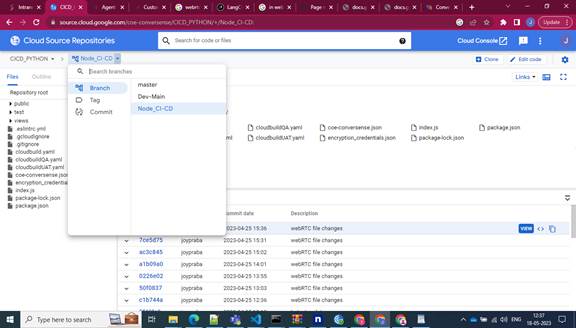
Cloud Source Repositories
Cloud Source Repositories is a Git-powered wonder that seamlessly integrates with other GCP services like Cloud Build and Cloud Function. This can be used to store your application source code where building and deploying are effortless.
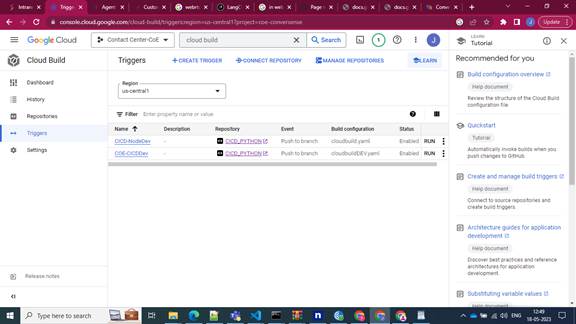
Cloud Build
Cloud Build is the hero of automated building, testing, and deployment. With Cloud Build, your applications are automated using the fully managed CI/CD infrastructure with elegance and speed.
Cloud Build supports various programming languages and build tools from Java and Python to Node.JS and Docker. And the best part? It is not just limited to building, it also integrates with other GCP services like Kubernetes, App Engine, and Cloud Functions, extending its influence across GCP ecosystem.
Need to create a Cloud Build project in GCP and define the build configuration file? Set up your cloud build project, define the build configuration file as YAML file, and yes, you are now ready to initiate builds manually or automatically when code changes are pushed to your source code repository. Cloud Build also provides a dashboard where you can monitor the build and deployment status of your applications.
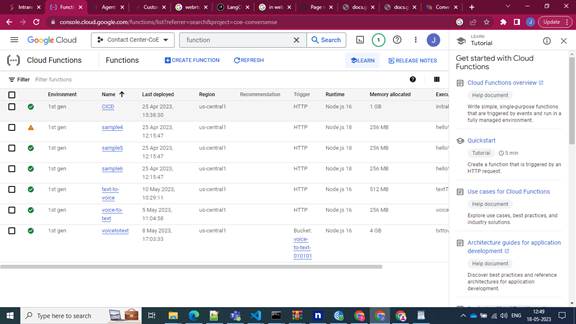
Cloud Function
Let’s talk about serverless magic – Google Cloud Functions that allows you to run your code in response to events and automatically scales your applications as needed. Imagine writing a code in response to events, scales as needed, and leaves you with nothing to worry. When this merges with Google Cloud Build, you can automatically build and deploy your code to Cloud Functions whenever changes are made to your source code repository.
Cloud Resource Manager API
Managing cloud resources programmatically has never been so empowering. Cloud Resource Manager API is a bridge that connects you to your Google Cloud Platform (GCP) resources with API-driven control. It provides a set of methods to create, read, update, and delete projects, folders, and organizations within GCP.
CI/CD Process for NodeJS
In the world of NodeJs, orchestrating a seamless CI/CD process is a breeze within GCP’s embrace. We have pushed the base code in the master branch and created multiple branches as per the requirement. After creating, a trigger is also created in the cloud build service. Before that, there is an YAML file which encapsulates from package installation to deployment.
- Package Installation
- ESlint checking
- Unit Testing checking
- Deployment to cloud function
Package Installation:
– name: “node”
entrypoint: “npm”
args: [“install”, “”]
ESlint checking:
– name: “node”
entrypoint: “npx”
args: [“npx”, “eslint”, “index.js”]
Unit Testing:
– name: “node”
entrypoint:
“npm”
args: [“test”]
Deployment to Cloud function:
– name: “gcr.io/cloud-builders/gcloud” args:
[
“functions”, “deploy”,
“CICD”, -—> Deployment Name
“–trigger-http”,”–runtime”,
“Nodejs16”, -—> language runtime
“–entry-point”,
“initialHit”, -—> Cloud Function entrypoint
“–region”,
“Us-central1”, —–> Region
Name “–timeout”,
“540”, -—> Time Out
“–memory”,
“1GB”, -—> Memory allocation
]
On the time trigger, we push the code into the branch and hit the cloud build YAML file. We can observe in the log when the above list of operations is completed or fails. We can view the trigger URL from the trigger page in cloud function service once the deployment is complete. Use this to start the programme. Remember that the cloud function entry points in your application must be proper.
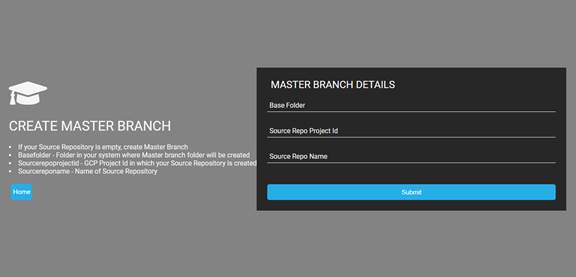
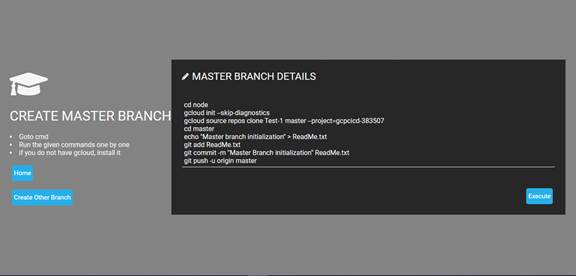
For Master branch generation, we are processing user input such as Base Folder, GCP Project ID, and Repository Name.
The command is then generated and saved in a shell script file based on the user input. Then we’ll go to the command page. The produced commands are shown here.
Using this command, we may manually create a branch. Else If you click the execute button, the shell script file will be launched, and the master branch will be created immediately.
Based on this feature, we have implemented the following set of features.
- Initial G-Cloud configuration
- Establishment of a repository
- Establishment of a master branch
- Other Branch Creation
- Build Trigger
- Build Notifier
- Generate Cloud Function
Conclusion
The implementation of CI/CD on Google Cloud Platform for your Node.js application redefines the software development process. By diminishing manual interventions and harnessing the prowess of Cloud Build and other GCP services, the application’s build, testing, and deployment become reliable and swift. The automation of these steps transcends errors, augments collaboration, and expedites the delivery of superior-quality software to users.
Contact us for more information.
Your Partner for End-to-End Digital Excellence
Accelerating transformation with integrated cloud, data, AI, automation, and CX solutions.